
FormSwift Extension
Instant form prefill extension engineered for enterprise-grade automation, speed, and accuracy across all web platforms.
Time Saved
Prefill Speed
Field Accuracy
Delivery Context And Business Outcome
Time Saved
Framework Support
Data Breaches
Execution Time
Client Industry, Timeline, Team, Stack, And Result
Client Industry
Enterprise technology
Project Timeline
12 weeks
Team Size
6 specialists
Tech Stack
Modern web stack
Headline Result
Instant form prefill extension engineered for enterprise-grade automation, speed, and accuracy across all web platforms.
Problem Statement, Baseline, And Success Criteria
Clear pre-project constraints and measurable targets establish how outcomes are evaluated.
Problem Statement
Teams repeatedly spent time filling the same data across multiple sites and workflows.
Goals And Success Criteria
Where Performance Started Before Delivery
Time Saved (Before)
Prefill Speed (Before)
Field Accuracy (Before)
What The Engagement Needed To Deliver
FormSwift automatically fills any web form in fractions of a second by detecting fields, mapping user-approved data, and populating without breaking dynamic page behavior.
Built for enterprise environments, it turns repetitive form filling into a one-click action while preserving accuracy and security.
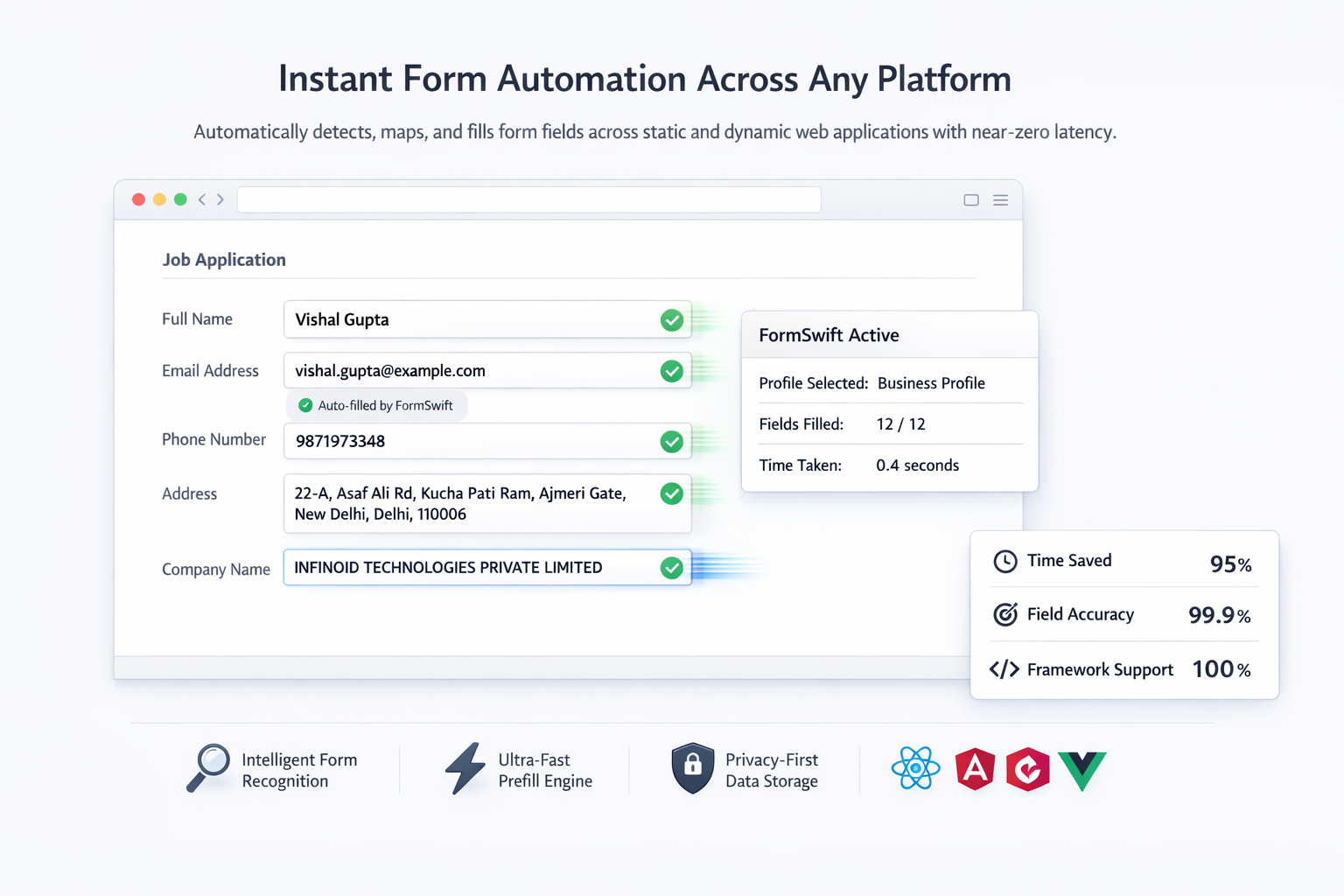
FormSwift instant form automation overview
Discovery To Optimization With Duration
Discovery
1-2 weeksStakeholder interviews, baseline audit, and scope alignment.
Design
1-2 weeksUX flows, technical architecture, and sprint planning.
Build
4-8 weeksIncremental feature delivery, integrations, and instrumentation.
QA
1-2 weeksFunctional testing, performance validation, and accessibility checks.
Launch
3-5 daysControlled release, production validation, and monitoring.
Optimization
2-4 weeksPost-launch iteration based on telemetry and user feedback.
How The Product Direction Was Resolved
Repetitive Manual Entry
Teams repeatedly spent time filling the same data across multiple sites and workflows.
Dynamic Forms Failure
Modern frameworks often broke older automation approaches.
Data Inconsistency
Repeated manual input made clean, reusable data harder to maintain.
Privacy Concerns
Enterprise teams needed more control over where and how data could be reused.
Ultra-Fast Detection Engine
Dynamic DOM scanning keeps execution fast even in more complex environments.
Intelligent Field Mapping
Semantic recognition supports a wider range of business and identity fields.
Multi-Profile Data Management
Users can reuse different profiles across personal and business workflows.
Enterprise-Grade Security
Audit-oriented privacy controls reinforce user trust and governance.
Why This Approach Was Chosen
Ultra-Fast Detection Engine
Tradeoff: Repetitive Manual Entry
Rationale: Selected for long-term scalability, maintainability, and stronger business outcomes.
Intelligent Field Mapping
Tradeoff: Dynamic Forms Failure
Rationale: Selected for long-term scalability, maintainability, and stronger business outcomes.
Multi-Profile Data Management
Tradeoff: Data Inconsistency
Rationale: Selected for long-term scalability, maintainability, and stronger business outcomes.
Capabilities Delivered Across The Platform
Form Detection
Field Mapping
Data Management
Performance
Automation
Security
Before And After Comparison With Hard Numbers
| Metric | Before | After | Delta |
|---|---|---|---|
| Time Saved | 100 index | 195 index | 95% |
| Prefill Speed | 100 index | <1 sec | <1 sec |
| Field Accuracy | 100 index | 200 index | 99.7% |
Technical Outcomes After Launch
Lighthouse Performance
Core Web Vitals
Accessibility Score
Why This Variant Was Built For Enterprise Usage
95% Time Saved
High-volume workflows move significantly faster without repetitive entry.
Works Everywhere
The extension adapts to broad framework coverage and more dynamic form structures.
Enterprise Security
Storage and data handling follow stronger privacy-first patterns.
Zero Learning Curve
The experience stays accessible even for non-technical operators.
Continuous Improvement Opportunities
Expand A/B testing coverage for high-traffic user journeys.
Add deeper event-level analytics for conversion funnels.
Extend automation around regression and accessibility audits.
Next step
Ready To Automate Form Filling?
Join enterprises that transformed form filling workflow with FormSwift. From instant prefills to enterprise security, let’s eliminate manual data entry forever.
What we cover
- 01
Named delivery from the Noida desk
- 02
Integrations against systems you already run
- 03
Hire dedicated engineers if you need people on your cadence
Typical first call · 30–45 min